I have long been interested in the ramification of control schemes on a game design, and I hope this post helps demonstrate the importance of subtle input nuances. I also want to present an example of the work, thought and exploration requires when designing a responsive interaction.
INVERSUS has two core attacks. A quick tap of the fire button will shoot a single projectile. Holding the fire button will charge a shot and if the player holds long enough, three lanes of projectiles are shot.
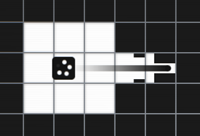
Normal Shot
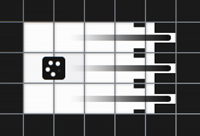
Charged Shot
Only the normal shots were implemented when I started making the game. When a fire button was pressed, a projectile was released. Life was simple. Things changed when I decided to implement the charged shots.
The charge mechanic adds substantial depth to the game (perhaps I’ll dig into that in a future post), but comes with a significant cost. In order to detect an uncharged shot versus a charged shot, I need to evaluate how much time has passed between the button being pressed and the button being released. This means that I can no longer spawn the normal single-lane projectile on button press. I need to wait until button release. As a consequence, the game gained a negative user experience in perceived input lag (the extra time it takes a player to release the button after press).
How bad is it?
The amount of time it takes to press and release a button varies from person to person, and varies according to the conscious effort made to actually release the button as fast as possible. Let’s say it takes the average player around 0.15 seconds (which I believe to be a reasonable estimate). This might be only a fraction of a second, but it creates a noticeable input lag between the player’s intent and the game’s response on screen. Subtle differences likes this can make or break a game’s satisfying feel.
Blocking
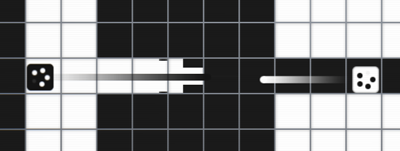
Currently, I have projectiles moving at 11 tiles per second. How far will a projectile move during the additional 0.15 second delay to detect a button release?
\(\frac{11 \, {tiles}}{1 \, {sec}} 0.15 \, {sec} = 1.65 \, {tiles}\)
When under attack in INVERSUS, projectiles will collide with one another and cancel out. This encourages the player to shoot at incoming projectiles to block them. Given the above math, we can see the impact on the experience. If a bullet is moving towards your ship and you pressed the fire button when it was within 1.65 tiles away, you likely won’t release the button in time to block. You might also curse the screen when you subsequently explode and lose the round.
Aiming
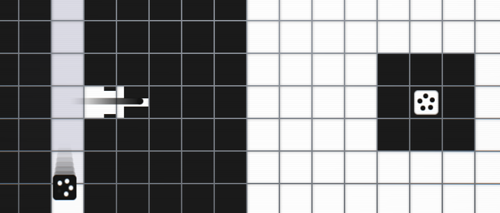
The player controlled ships move at a speed of 10 tiles per second (slightly slower than projectiles). How far will a ship move in the estimated 0.15 second input lag?
\(\frac{10 \, {tiles}}{1 \, {sec}} 0.15 \, {sec} = 1.5 \, {tiles}\)
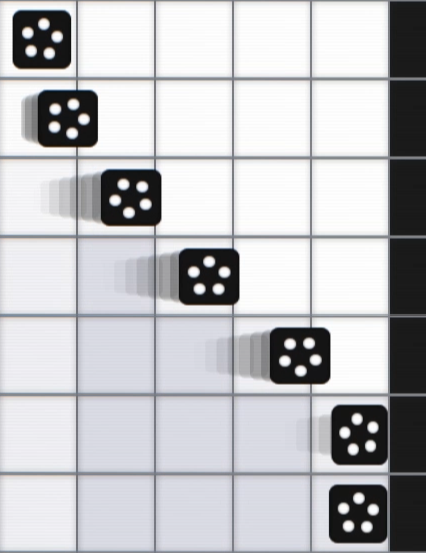
Players often move perpendicular to the direction of fire. For example, the player might be moving from top to bottom while lining up a shot left to right. Due to the input delay, we can tell that a player moving at max speed needs to start the press-release motion 1.5 tiles early. This is going to cause a lot of missed shots and frustration when the player isn’t stationary.
Finding a solution
I knew this was an issue the moment I added charged shots, but I also wanted to evaluate how they played before just dismissing an on-release input scheme. With the charge mechanic being such a strategic success, I’ve lived with the input delay for close to a year and half. That whole time I’ve been mulling over potential solutions and being reminded of the issue watching play tests. I recently had to prep a new build of the game for submission to the IGF and SXSW festivals and used this as my motivation to finally tackle the issue.
Blocking
I have always viewed the delay in blocking incoming projectiles as the larger problem. When this one goes wrong, you lose the match almost instantly. There isn’t much worse of a response.
My long considered plan for fixing this was to do more than just firing a single projectile on button release. I wanted to also fire a small pulse wave on button press. I hoped that on a quick tap the two would trigger close enough to look as one element aesthetically. If you held the button for a while, the two would be separated. On press, the little pulse would come out. On release, the normal bullet fires. If the short pulse wave lasted long enough to cover the input delay, it could be used to block a shot in these frustrating cases.
Prototype 1: Hold to block
When it came time to prototype the solution, I decided to start with a variant that was a bit simpler. The INVERSUS input layout has a separate fire button for each direction (up, down, left, right). When deciding to charge a shot, you need to choose a button and commit to a direction at the start of the charge.
I made it so that when in the charging state (the time between button press and release) the player will block an incoming shot from the charged direction. Once a shot is blocked, the charge is canceled and the bullet is forfeit. An interesting side effect of this mechanic was that it placed even more pressure on your opponent to flank.
The results were promising and the problem cases no longer resulted in a death. It initially created an odd state where the player might still hold down the charge button throughout a block. Because the ammo is consumed and the shot is canceled, players end up in a state where a button is held but the game isn’t reacting. To fix this, I made the next shot start charging automatically if the player doesn’t release the button after a short time.
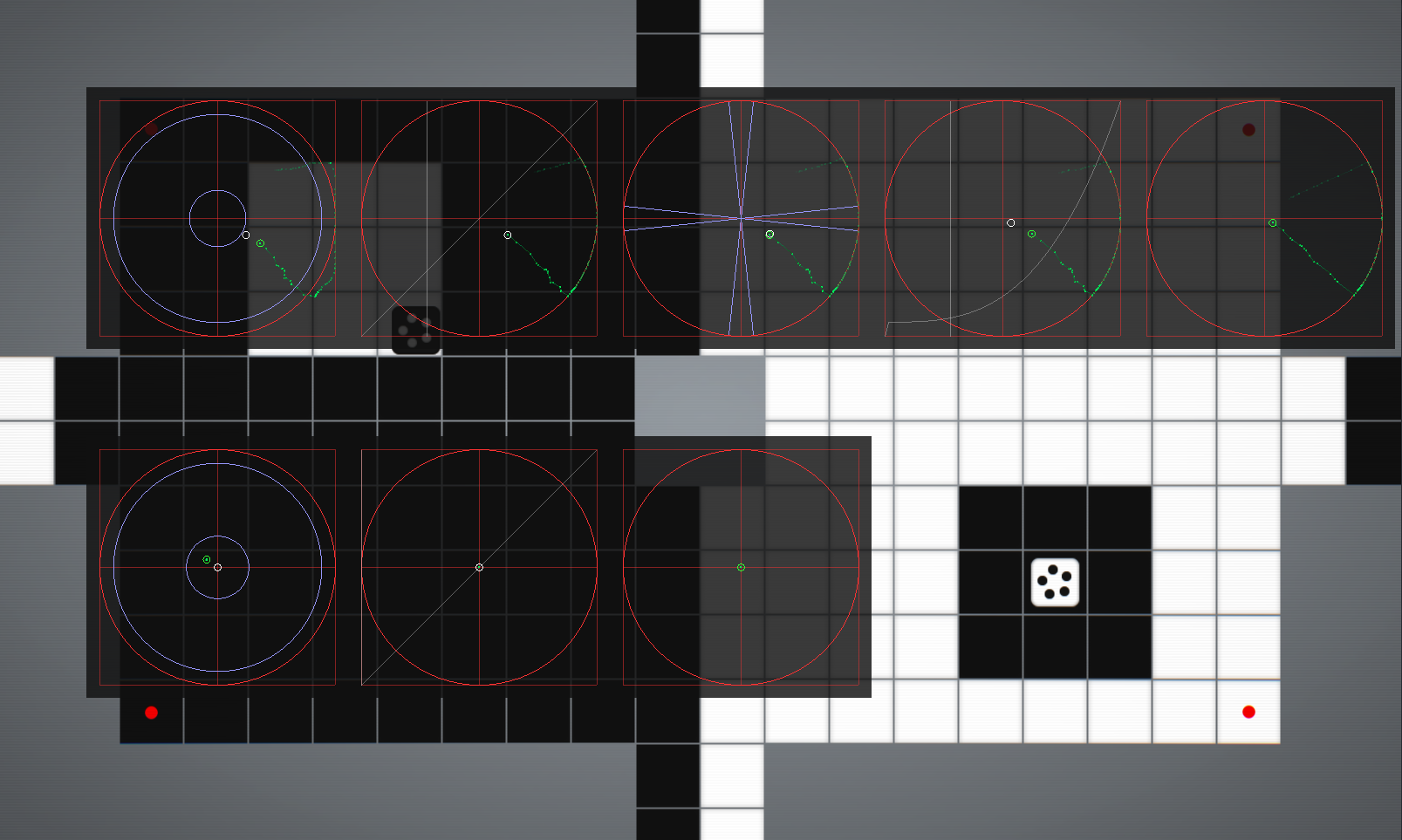
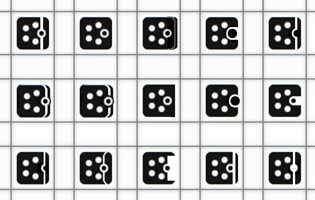
The remaining issues were in visual communication. INVERSUS has a specific minimalist art style that is not conducive to small details. The new blocking system asked for a directional shield to be communicated on the ship, but it couldn’t compete with the other communication channels from power-ups and ammo counts.
I never found anything perfect, but here is a subset of concepts I tried out:
Prototype 2: Pulse on press
My next prototype was based around the pulse concept I had initially conceived. On button press, I shot out a slower projectile with a very short lifetime. On release, I shot out the standard projectile. Once again, this solved the desired problem. It also introduced a really fun parry mechanic because if you intentionally timed your press such that the pulse blocked an incoming projectile, your button release would then be able to shoot your projectile unimpeded. Unfortunately, it also came with a new set of issues.
The pulse is detached from the ship and due to the high speed of the ship, the ship can quickly move into or away from the pulse. When moving over the pulse, the visual language gets messy. When moving away from it, it creates this odd effect of both visually lingering in space and still being able to block a bullet.
I followed this up with a slight variation in which the pulse is positioned relative to the ship. If the ship moved, the pulse moved with it. This read much better in the common case, but it meant that when the player moved up against a wall, the pulse could draw out of bounds. The myriad edge cases led me to move onto a new prototype.
Prototype 3: Shoot on press
It had been a long time since I played the game with the charge shot completely removed. I decided it was worth revisiting this simpler system now that so much else surrounding it had been refined. It felt great. Really great. However, the strategic depth and player expressiveness took a huge hit. In the end, it was worth playing in this state for a while to remember the quality bar I wanted to achieve.
Prototype 4: Shift to charge
The next prototype involved modifying the control scheme in an attempt to get the best of both worlds. I made it so that fire buttons would launch a projectile on press by default, but if you were holding down a “shift” button it would change the functionality to allow charging. The end result was a cumbersome interface that felt unnecessarily complicated.
This also needed smart input chord detection which was not compatible with the other design constraints. To be more specific, a player will often press the shift button and a fire button at the same time with the intent to start a charge shot. For this to work well, you need to detect the fire button being accidentally pressed a hair prior to the shift button. Unfortunately, the whole goal of this is to get the projectile launch immediately on press. Canceling it on a late chord detection also won’t work due to how fast the projectile travels.
Prototype 5: Separate charge button
Taking a slight spin on the “shift to charge” system, I tried changing the shift button into a charge button. In this world, holding the charge button (assigned to one of the shoulder triggers) would immediately cause the ship to charge up without requiring the player to pick a fire direction. Once fully charged, pressing any of the fire buttons immediately launched the triple lane shot in the appropriate direction.
It actually felt pretty good using the trigger input for charging up, but mechanically this system was not viable. Without the penalty of committing to your fire direction at the start of charging, players were strongly encouraged to always be charging. Removing the return on investment style choice from the charge mechanic negated all the strategy that made it worth keeping.
Prototype 6: Fire and then charge
If the projectiles moved slower, there would be a solution in which the single lane shot is launched on press, but then canceled if the player continues to hold the button. I could then transition to the charged shot that launches on release. However, the projectiles move so fast that they go too far for a reasonable cancel period (about 1.65 tiles according to the earlier math).
With that ruled out, I decided to try a system where on-press would fire a single lane shot and continuing to hold the button would charge up the next shot. This felt great in the tactile sense, but created very awkward choices in game. Players would often waste one ammo just to gain the ability to charge the following shot. It made players immediately question why anyone would ever design a game with such a weird control scheme.
Prototype 7: Hold to detonate
At this point I decided to reevaluate the whole charge thing and try some alternate replacements that would control better. I started with single-lane shots firing on button press. If you continued to hold the button, it would prime the in flight projectile for detonation. By releasing the button before the projectile hit a wall, it would detonate early in a small explosion. This felt fine and added an interesting skill path, but was far too powerful (hitting players around cover) and presented the player with far less interesting strategic choices.
Prototype 8: Direction shift
Continuing to explore some new design space, my next attempt also started with firing a single projectile on button press. This time, holding the button down and then sliding your input from one fire direction to another would steer the projectile at 90 degree turns. It was almost like playing the game snake with each bullet. The result was fun to interact with, but the player just focused on the bullet and no longer cared much about movement.
Prototype 9: Parry and riposte
Finally, I arrived at a prototype that I was happy with. It is a melding of the “hold to block” and “pulse on press” prototypes. There is now a brief moment on button press where the player is blocking in the fire direction. This is accompanied by a quick and subtle animation on the appropriate side of the ship.
This once again creates the high-skill parry mechanic that was in my “pulse on press” prototype. Waiting to press the button until just before being hit, lets you block the incoming shot without spending ammo yet. You can then release the button to fire your bullet back. The end result is like performing a parry and riposte if you time your shot correctly. Timing too early results a classic projectile-to-projectile block. Timing too late ends up in taking a hit.
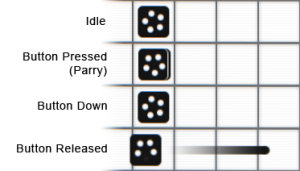
It solves the initial problem case where a player presses the button in time but does not release it and it adds one more interesting choice for players to evaluate. I’d call this a success.
Aiming
With the blocking issue out of the way, all that is left to solve is the shot delay on lateral motion. In retrospect, the solution seems a bit obvious but it took me a long time to recognize that I could solve the lateral input issue with a separate system from the block deflection issue.
When the player presses a fire button, I track the current ship position. If the player releases the button quickly after pressing it, the projectile launch position is adjusted to match the press position, but only along the axis perpendicular to the fire direction.
If you are moving towards or away from the direction you are firing in, the projectile firing works just like it always has. The projectile will never spawn inside of you and it will never spawn far ahead of you.
If you are moving laterally to the firing direction, the projectile position is set to where you were just a moment ago (in the lateral direction). You can now line up those shots better.
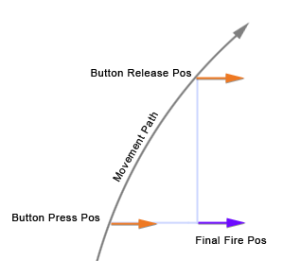
The correction is applied at 100% if the button is released within 0.11 seconds (i.e. the projectile is fully shifted to the on-press location). The correction fades out to 0% at 0.19 seconds. This prevents any odd discontinuities when hold times vary slightly.
Results
It still doesn’t feel as snappy as a fire-on-press system, but it is far closer. Skilled players sensitive to timing won’t feel cheated by the game and new players learn to time their shots far quicker.
The biggest missing piece is improving the feedback of the parry to celebrate the player skill and separate it from normal projectile-to-projectile collisions. Right now the sound is different (although not great) and the visual effects are reused.